Time Zone Converter – Convert Time Between Time Zones
Time Zone Converter – Convert Time Between Time Zones: Powerful Guide + 15 Essential Tips
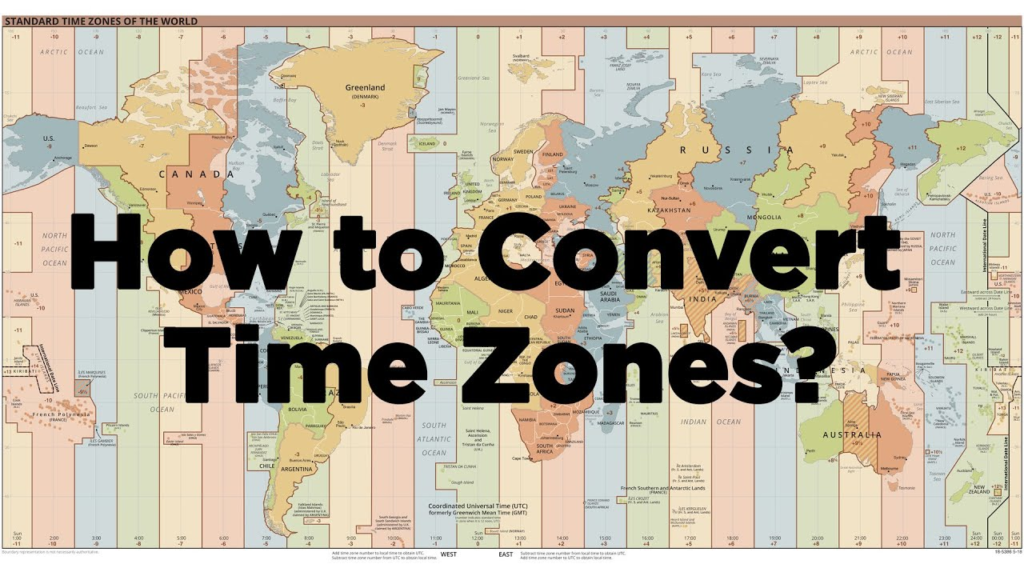
The world is divided into different time zones, which can make scheduling across countries surprisingly difficult. When it’s morning in one location, it may already be evening or even the next day somewhere else.
A Time Zone Converter makes this problem much easier. Instead of manually calculating the difference between locations, you can enter a time, select the source time zone, choose the destination time zone, and get the corresponding local time.
Time zone conversion is useful for remote teams, international businesses, travelers, students, event organizers, freelancers, and anyone communicating with people in another part of the world.
In this comprehensive guide, you’ll learn how a Time Zone Converter works, how to convert time between time zones, why UTC matters, how daylight saving time affects conversions, common mistakes, and practical tips for accurate scheduling.
What Is a Time Zone Converter?
A Time Zone Converter is an online tool that converts a specific time from one time zone into the corresponding time in another time zone.
For example, if a meeting is scheduled for 10:00 AM in New York, a time zone converter can help determine what time that meeting occurs in London, Dubai, Tokyo, or another location.
A converter typically requires:
- The original date.
- The original time.
- The source time zone.
- The destination time zone.
The tool then calculates the corresponding local time.
This is much easier than manually checking UTC offsets and daylight saving rules.
What Is a Time Zone?
A time zone is a geographical region that observes a particular standard time.
The Earth rotates continuously, so different parts of the planet experience daylight and nighttime at different times. Time zones provide a standardized way of organizing local clocks.
There are many named time zones around the world.
Examples include:
- Eastern Time
- Central European Time
- India Standard Time
- Pakistan Standard Time
- Japan Standard Time
- Australian Eastern Time
Some regions also change their clocks during part of the year because of daylight saving time.
This is one reason time conversion can become more complicated than simply adding or subtracting a fixed number of hours.
How Does a Time Zone Converter Work?
A Time Zone Converter uses time zone rules to determine the equivalent time in another location.
A simplified process looks like this:
Local Time → Source Time Zone → UTC Reference → Destination Time Zone → Converted Time
For example, imagine a meeting is scheduled in one location.
The converter first determines the UTC offset applicable to the source location on that specific date.
It then calculates the equivalent UTC time and applies the destination location’s applicable offset.
This process helps account for different offsets and, when supported, daylight saving rules.
How to Convert Time Between Time Zones
Using an online time zone converter is usually straightforward.
Step 1: Select the Date
Choose the date of the event or meeting.
The date is important because time zone rules can change throughout the year.
Step 2: Enter the Time
Enter the local time you want to convert.
For example:
3:00 PM
Step 3: Select the Source Time Zone
Choose the time zone where the original time applies.
Step 4: Select the Destination Time Zone
Choose the location or time zone you want to convert into.
Step 5: View the Result
The converter displays the corresponding local time.
Always check whether the converted result falls on the same calendar day.
Understanding UTC and GMT
Two terms frequently appear when discussing time zones: UTC and GMT.
What Is UTC?
UTC stands for Coordinated Universal Time.
It serves as the primary global reference for civil timekeeping and is used as the basis for calculating time zone offsets.
Time zones can be described using offsets from UTC.
For example:
UTC+5
means the local time is five hours ahead of UTC.
What Is GMT?
GMT stands for Greenwich Mean Time.
GMT has historical importance and is still commonly used in everyday conversation.
UTC and GMT can appear similar in many practical situations, but UTC is the modern international reference standard used by computer systems and timekeeping systems.
Time Zone Offsets Explained
A time zone offset describes how far a local time is ahead of or behind UTC.
Examples include:
- UTC−8
- UTC−5
- UTC
- UTC+1
- UTC+5
- UTC+9
Suppose a location uses UTC+5.
If UTC time is:
10:00 AM
then local time is:
3:00 PM
This basic calculation becomes more complicated when daylight saving time or historical time zone rules are involved.
Daylight Saving Time and Time Conversion
Daylight saving time, often called DST, is one of the biggest reasons manual time conversion can be confusing.
Some regions move their clocks forward during part of the year and later move them back.
This means the difference between two locations can change depending on the date.
For example, a location might have one UTC offset during winter and another during summer.
Why DST Matters
Suppose two companies normally have a five-hour time difference.
When one location changes its clocks for daylight saving time and the other doesn’t, the difference may temporarily become four or six hours.
Therefore, don’t rely on a fixed time difference without checking the date.
A good Time Zone Converter uses the applicable time zone rules for the selected date.
Time Zone Converter for International Meetings
International meetings are one of the most common uses for a time zone converter.
Imagine a team has members in:
- New York
- London
- Dubai
- Singapore
A meeting scheduled for 9:00 AM in one location may happen at a completely different hour for another team member.
A converter helps organizers find a suitable meeting time.
Meeting Planning Tip
When scheduling international meetings, consider the working hours of everyone involved.
A time that is convenient for one person may be very early in the morning or late at night for someone else.
For global teams, rotating meeting times can also help distribute inconvenience fairly.
Time Zone Converter for Remote Work
Remote work has made time zone management even more important.
A distributed team may have employees working from several countries.
Time zone conversion can help with:
- Team meetings
- Project deadlines
- Client calls
- Support coverage
- Work shifts
- Interview scheduling
- Collaboration
For asynchronous teams, clearly stating the time zone next to every important deadline can prevent confusion.
For example:
Project deadline: Friday, 5:00 PM UTC
is generally clearer than:
Project deadline: Friday, 5:00 PM
The first version provides a specific reference point.
Time Zone Converter for Travel
Travelers frequently cross time zones.
If you fly from one country to another, the local clock may change significantly even though the actual duration of the flight is much shorter than the apparent difference.
A time zone converter can help you understand:
- Departure time
- Arrival time
- Local hotel check-in time
- Connecting flight times
- Tour schedules
- Meeting times
- Event start times
Travel Planning Example
Suppose your flight departs at 8:00 PM from one time zone and arrives at 7:00 AM in another.
The arrival time is local time at the destination, so the apparent time difference doesn’t necessarily represent the flight duration.
Always check whether a travel schedule displays local departure and arrival times.
Time Zone Converter for Online Events
Online conferences, webinars, product launches, gaming events, and livestreams often attract people from multiple countries.
Publishing only one local time can confuse international audiences.
For example:
Event: 6:00 PM Eastern Time
may not be immediately clear to viewers elsewhere.
A time zone converter can help organizers provide equivalent times.
A better event announcement might list:
- New York time
- London time
- Dubai time
- Tokyo time
This makes participation easier for a global audience.
Time Zone Converter for Business
International businesses regularly communicate across time zones.
Time conversion can help with:
- Client meetings
- Sales calls
- Customer support
- International deadlines
- Remote employees
- Shipping coordination
- Global marketing campaigns
For businesses, a small scheduling mistake can result in missed meetings or delayed work.
Using a reliable converter before confirming an international appointment can prevent unnecessary confusion.
Common Time Zone Conversion Mistakes
Time conversion errors are easy to make.
Mistake 1: Ignoring the Date
The time difference can change because of daylight saving rules.
Mistake 2: Using a Fixed Offset
A location may not use the same UTC offset throughout the year.
Mistake 3: Forgetting the Date Change
Converting time can move an event to the previous or next calendar day.
Mistake 4: Confusing Standard Time and Daylight Time
Some regions use different clock settings during different parts of the year.
Mistake 5: Assuming Nearby Countries Share the Same Time Zone
Geographical proximity doesn’t guarantee identical timekeeping rules.
Mistake 6: Using an Informal Time Zone Name
Names such as “EST” can sometimes be ambiguous in software or international communication.
For important scheduling, a specific location-based time zone is often clearer.
Benefits of Using an Online Time Zone Converter
An online Time Zone Converter offers several advantages.
Fast Results
You can convert time within seconds.
Convenient
You don’t need to manually calculate UTC offsets.
Better Accuracy
A reliable tool can account for date-specific time zone rules.
Useful Worldwide
You can compare locations across continents.
Helps Avoid Scheduling Errors
Correct conversion reduces the risk of missed meetings and events.
Easy for Non-Technical Users
You don’t need to understand complex time zone databases to convert a time.
How Accurate Is a Time Zone Converter?
A reliable time zone converter can provide highly accurate results when it uses current and properly maintained time zone data.
However, accuracy depends on the quality of the underlying time zone information.
Time zone rules can change because governments sometimes change their official policies.
For current or future events, use a converter that regularly updates its time zone database.
Historical Dates
Historical conversions can be more complicated because time zone rules have changed over the years.
If you are working with historical dates, use a system that supports historical time zone data.
Time Zone Conversion Examples
Let’s look at some simplified examples.
Example 1: UTC to UTC+5
Suppose the time is:
10:00 AM UTC
A location using UTC+5 would have:
3:00 PM
The local time is five hours ahead.
Example 2: UTC+5 to UTC
Suppose the local time is:
6:00 PM UTC+5
Subtract five hours:
1:00 PM UTC
Example 3: Crossing Midnight
Suppose an event takes place at:
11:00 PM in one time zone
The destination may be several hours ahead.
The converted time could become:
2:00 AM the next day
This is why the date should always be displayed along with the converted time for important events.
Time Zone Converter and Date Changes
One of the most important things to remember is that converting time can change the date.
For example:
Monday, 11:00 PM
could become:
Tuesday, 3:00 AM
after conversion.
Similarly, a time in one location can convert to the previous day in another location.
This is particularly important for:
- Flight bookings
- International meetings
- Deadlines
- Online events
- Software releases
- Customer support schedules
Always include the date when scheduling across time zones.
Time Zone Converter for Software Developers
Developers frequently work with time zones when building websites and applications.
Modern software commonly stores timestamps in a standardized format and converts them into local time for users.
Developers should be careful when working with:
- UTC timestamps
- ISO 8601 dates
- IANA time zone identifiers
- Daylight saving transitions
- Date-time formatting
- User locale settings
For example, a location-based identifier such as America/New_York can provide more information than simply storing a generic UTC offset.
This matters because the offset for a location can change during the year.
Time Zone Converter Privacy and Security
Basic time conversion usually doesn’t require personal information.
You generally only need:
- Date
- Time
- Source time zone
- Destination time zone
Avoid entering unnecessary sensitive information into online tools.
A time zone converter should not normally require:
- Passwords
- Payment details
- Government identification
- Account credentials
- Confidential business information
For private business schedules, check the privacy practices of the service you’re using.
Tips for Converting Time Correctly
Follow these tips when converting time between locations.
1. Always Include the Date
Never convert a time without considering the date.
2. Use Specific Locations
When possible, select a city or named IANA time zone instead of relying only on a generic abbreviation.
3. Check Daylight Saving Time
Determine whether either location changes its clocks during the relevant period.
4. Check the Resulting Date
The converted time may fall on the previous or next day.
5. Confirm Important Meetings
For high-priority meetings, verify the converted time with the calendar invitation.
6. Use UTC for Global Deadlines
UTC can provide a clear common reference for international systems and schedules.
7. Avoid Manual Calculations for Complex Cases
If multiple time zones or daylight saving rules are involved, use a reliable converter.
8. Communicate Time Zones Clearly
Write:
2:00 PM UTC
rather than simply:
2:00 PM
when communicating internationally.
Time Zone Converter vs Manual Conversion
Both approaches can work, but they serve different purposes.
| Method | Best For | Limitation |
|---|---|---|
| Manual Conversion | Simple fixed-offset calculations | Easy to make mistakes |
| Online Converter | Everyday international scheduling | Requires an online tool |
| Calendar Software | Meetings and appointments | Requires setup |
| Programming Libraries | Applications and automation | Requires technical knowledge |
For a quick conversion, an online Time Zone Converter is often the easiest option.
Time Zone Abbreviations and Their Limitations
Time zone abbreviations can sometimes create confusion.
For example, an abbreviation may have different meanings in different contexts.
Names such as:
- EST
- CST
- PST
- IST
can be ambiguous because different countries or regions may use similar abbreviations.
For international communication, a location-based name or explicit UTC offset can be clearer.
For example:
America/New_York
provides more specific information than simply saying EST, especially because the New York region changes between standard time and daylight time.
Frequently Asked Questions
What is a Time Zone Converter?
A Time Zone Converter is an online tool that converts a date and time from one time zone into the corresponding local time in another time zone.
How do I convert time between time zones?
Enter the date and time, select the source time zone, choose the destination time zone, and view the converted result.
Why does the date matter when converting time?
Time zone offsets can vary by date, especially in regions that observe daylight saving time. Conversion can also move an event to the previous or next calendar day.
What is UTC?
UTC stands for Coordinated Universal Time and serves as the primary global reference for time zone offsets.
Is UTC the same as GMT?
UTC and GMT are closely related in everyday use, but UTC is the modern international standard used as the reference for global timekeeping and computing.
What is daylight saving time?
Daylight saving time is a seasonal clock adjustment used in some regions. Clocks are typically moved forward during part of the year and moved back later.
Can a Time Zone Converter account for daylight saving time?
A properly maintained converter can account for applicable daylight saving rules when the correct date and location are selected.
Can time conversion change the date?
Yes. A converted time can fall on the previous or next calendar day.
What is the best time zone for international deadlines?
UTC is often useful as a common reference for global technical systems and international schedules. However, organizations may choose another clearly defined time zone for their operations.
Why are time zone abbreviations confusing?
Some abbreviations can refer to different regions or change meaning depending on context. Specific location-based time zones are often clearer.
Can I use a Time Zone Converter for travel?
Yes. It can help you understand departure times, arrival times, hotel schedules, tours, and appointments in different locations.
Can a Time Zone Converter be used for business meetings?
Yes. It is especially useful for scheduling meetings between international clients, employees, and remote teams.
Are time zone rules always the same?
No. Governments can change time zone policies, and daylight saving rules can change over time. Reliable tools need updated time zone data.
Should I use local time or UTC?
It depends on the situation. Local time is useful for everyday meetings and events, while UTC is often useful for international systems, technical operations, and globally coordinated schedules.
Conclusion
A Time Zone Converter makes it much easier to convert time between time zones without manually calculating offsets. Whether you’re scheduling a global meeting, planning international travel, working with a remote team, or organizing an online event, an accurate time conversion can prevent unnecessary confusion.
The most important factors are the date, source time zone, destination time zone, daylight saving rules, and possible date changes. A simple difference in hours isn’t always enough because time zone rules can vary throughout the year.
For everyday scheduling, an online converter is a fast and convenient solution. For software systems and international business, using clear time zone identifiers and UTC-based references can make communication even more reliable.
When dealing with international time, always include the date and time zone. A few extra seconds of checking can prevent missed meetings, incorrect deadlines, and scheduling problems.