JSON Formatter – Format JSON Online
JSON Formatter – Format JSON Online
Working with JSON is a normal part of modern web development, APIs, software applications, and data exchange. However, JSON data is often difficult to read when it appears as a single long line or contains deeply nested objects and arrays. A JSON Formatter solves this problem by converting compact or poorly organized JSON into a clean, structured, and easy-to-read format.
A JSON Formatter online can make JSON easier to inspect without requiring developers to install additional software. You can paste JSON into a formatter, organize the indentation, identify syntax problems, and review the structure of objects and arrays.
JSON is a text-based format used to represent structured data, including objects, arrays, strings, numbers, Boolean values, and null. It is widely used for transmitting data between applications and services.
What Is a JSON Formatter?
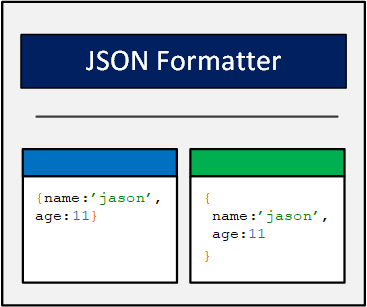
A JSON Formatter is a tool that takes JSON data and presents it in a structured, human-readable format. Instead of displaying everything on one line, the formatter adds indentation and line breaks around objects, arrays, and their properties.
For example, compact JSON may look like this:
{"name":"John","age":30,"skills":["HTML","CSS","JavaScript"]}After formatting, the same JSON becomes easier to understand:
{
  "name": "John",
  "age": 30,
  "skills": [
    "HTML",
    "CSS",
    "JavaScript"
  ]
}
The underlying information has not changed. The primary purpose of formatting is to improve readability and make the structure easier to inspect.
What Is JSON?
JSON stands for JavaScript Object Notation. Despite its name, JSON is not limited to JavaScript and is supported by many programming languages.
JSON is a standardized text format for representing structured data. It can contain objects and arrays as well as primitive values such as strings, numbers, Boolean values, and null.
JSON is commonly used when applications communicate with APIs. A server can send structured information as JSON, and the receiving application can parse that information and use the individual values.
Because JSON is relatively compact and easy for both machines and humans to work with, it has become a common format for web applications and data exchange.
How Does a JSON Formatter Work?
A JSON formatter tool generally reads the JSON text, parses it, and then produces a formatted representation with appropriate indentation.
In JavaScript, JSON.parse() converts a JSON string into the corresponding JavaScript value. If the input does not follow valid JSON syntax, JSON.parse() throws a SyntaxError.
Once the data has been parsed successfully, a formatter can represent the structure with spaces and line breaks.
The process can therefore be thought of as:
JSON text → Parse → Identify structure → Apply indentation → Formatted JSON
This makes nested objects and arrays much easier to inspect.
Format JSON Online
An online JSON formatter allows users to format JSON directly in a web browser. This can be particularly useful when you receive JSON from an API response, configuration file, application log, browser developer tools, or another source.
A typical workflow is simple:
- Copy your JSON data.
- Open an online JSON formatter.
- Paste the JSON into the input field.
- Click the format or beautify button.
- Review the formatted result.
- Copy or download the formatted JSON.
For small and medium-sized JSON snippets, an online formatter can save considerable time compared with manually adding indentation.
JSON Beautifier vs JSON Formatter
The terms JSON beautifier and JSON formatter are often used to describe the same basic process.
A JSON beautifier takes compact JSON and adds whitespace, indentation, and line breaks to make the structure easier to read. A formatter performs essentially the same task.
For example, an API response may be technically valid but difficult to inspect because all properties are displayed on a single line. Beautifying the response does not necessarily change its data; it simply presents that data in a more readable form.
Many tools also combine formatting with validation, making it possible to identify invalid JSON while attempting to beautify it.
JSON Formatter and JSON Validator
Formatting and validation are closely related, but they are not exactly the same thing.
A JSON validator checks whether the supplied text follows JSON syntax. A JSON formatter focuses primarily on presenting valid JSON in a readable structure.
In many tools, both features are included together. The tool first attempts to parse the JSON. If parsing succeeds, the JSON can be formatted. If parsing fails, the tool can report a syntax error.
JavaScript’s JSON.parse() throws a SyntaxError when the supplied text does not conform to JSON grammar.
This makes parsing a useful foundation for JSON validation.
Common JSON Syntax Errors
One of the biggest benefits of a JSON formatter is that it can help developers locate syntax problems.
Common JSON errors include:
- Missing commas
- Extra commas
- Missing quotation marks
- Using single quotes instead of double quotes
- Missing closing braces
- Missing closing brackets
- Invalid values
- Incorrect nesting
- Unsupported syntax copied from JavaScript
For example, this is invalid JSON:
{
  "name": "John",
  "age": 30,
}
The trailing comma after 30 is not valid JSON. MDN specifically notes that objects and arrays cannot contain trailing commas when parsed as JSON.
A formatter that validates input can identify this issue before producing formatted output.
JSON Requires Double Quotes
A frequent problem for developers working with JSON is confusing JavaScript object syntax with JSON syntax.
Valid JSON uses double quotation marks around property names and strings:
{
  "name": "John",
  "city": "London"
}
This is not valid JSON:
{
  'name': 'John',
  'city': 'London'
}
Although single quotes are commonly used in JavaScript source code, JSON strings must use double quotes.
An online JSON formatter can help identify this type of syntax problem quickly.
JSON Objects and Arrays
Understanding objects and arrays makes formatted JSON much easier to read.
A JSON object uses curly braces:
{
  "name": "John",
  "age": 30
}
An object contains name/value pairs.
A JSON array uses square brackets:
[
  "HTML",
  "CSS",
  "JavaScript"
]
Arrays contain ordered values. Those values can themselves be objects or arrays.
JSON supports nested structures, which is one reason formatting is so useful. A deeply nested response can become difficult to understand when everything appears on one line.
JSON Formatter for API Responses
APIs frequently return JSON data. Developers may receive a response containing dozens or hundreds of properties, nested objects, and arrays.
Raw API responses can be difficult to inspect when they are minified or returned as a single line. A JSON formatter for API responses can make the response much easier to analyze.
For example, developers can use formatted JSON to locate:
- User information
- Product details
- API status values
- Error messages
- Pagination information
- Nested records
- Metadata
- Configuration values
Formatting is especially useful while debugging an API integration because the structure becomes easier to visually inspect.
JSON Formatter for Developers
Developers use JSON formatters for many everyday tasks. A formatter can help when debugging an application, checking an API response, reviewing configuration data, or preparing JSON for documentation.
It can also make code reviews easier because properly indented JSON is easier for another developer to understand.
For large projects, consistent formatting can improve readability and reduce the time required to locate specific properties.
A formatter is therefore a small tool with practical value across frontend development, backend development, API testing, automation, and software engineering.
JSON Formatter for API Testing
API testing often involves sending and receiving JSON payloads.
When testing a request, developers may need to inspect a request body such as:
{
  "username": "example",
  "email": "user@example.com",
  "active": true
}
The response may contain much more complex data.
A JSON formatter allows developers to inspect that response in a structured way. This can make it easier to determine whether the API returned the expected fields and values.
Formatted JSON can also make error responses easier to understand during testing.
JSON Formatter for Configuration Files
Many applications use JSON files for configuration. These files may contain settings, options, paths, feature flags, or other structured information.
Readable formatting makes configuration files easier to maintain.
For example:
{
  "server": {
    "host": "localhost",
    "port": 3000
  },
  "features": {
    "logging": true,
    "debug": false
  }
}
The indentation makes the relationship between the properties immediately visible.
When configuration files become deeply nested, formatting becomes even more valuable.
JSON Pretty Print
JSON pretty print is another common term for formatting JSON.
Pretty printing adds whitespace to JSON output to improve human readability. JavaScript’s JSON.stringify() method supports a space parameter that controls indentation when converting a JavaScript value into JSON text.
For example:
JSON.stringify(data, null, 2);The final 2 tells JavaScript to use two spaces for indentation.
Without indentation, JSON may be produced as a compact string. With pretty printing, nested structures become easier to read.
JSON Minifier vs JSON Formatter
A JSON formatter and a JSON minifier perform opposite presentation tasks.
Formatting adds whitespace and line breaks to make JSON easier for humans to read.
Minification removes unnecessary whitespace to create a more compact representation. This can be useful when JSON needs to be transmitted or stored efficiently.
For example, formatted JSON:
{
  "name": "John",
  "age": 30
}
Minified JSON:
{"name":"John","age":30}The underlying data is equivalent, but the visual presentation is different.
A useful JSON tool may offer both formatting and minification so developers can switch between human-readable and compact versions.
JSON Formatter and JSON Parser
A JSON parser interprets JSON text and converts it into a structure that software can work with.
In JavaScript, JSON.parse() accepts a JSON string and returns the corresponding JavaScript value. It can return an object, array, string, number, Boolean value, or null, depending on the input.
Formatting usually depends on successfully understanding that structure.
If the parser encounters invalid JSON, it cannot correctly interpret the input. This is why a good formatter often doubles as a syntax checker.
The distinction is important: a formatter improves presentation, while a parser interprets the data.
JSON Stringify and Formatting
JavaScript’s JSON.stringify() performs the reverse type of conversion from JSON.parse().
JSON.parse() converts JSON text into a JavaScript value, while JSON.stringify() converts a JavaScript value into a JSON string.
The third parameter of JSON.stringify() can control indentation:
JSON.stringify(data, null, 2);This makes JSON.stringify() useful for generating readable JSON output directly inside JavaScript applications.
A formatter website can provide similar functionality without requiring the user to write JavaScript code.
JSON Formatter for Large JSON Files
Large JSON files can contain thousands of lines or deeply nested structures. Formatting can make such files significantly easier to navigate.
However, extremely large files may require more processing power and memory. Browser-based tools may also impose file-size limitations.
For very large datasets, developers may prefer command-line tools, code editors, dedicated JSON viewers, or local processing.
When working with sensitive or proprietary data, local tools can also be preferable because they reduce the need to upload information to an external website.
Is an Online JSON Formatter Safe?
The answer depends on how the particular service processes your data.
JSON files may contain sensitive information such as customer records, API responses, internal configuration, credentials, tokens, or proprietary business information. You should therefore avoid pasting confidential data into an online tool unless you understand how the service handles it.
For public or non-sensitive JSON, an online formatter can be convenient.
For private information, consider using a local editor, browser-based tool that explicitly processes data locally, or a command-line formatter running on your own computer.
Security should always be considered before uploading application data to an external service.
How to Format JSON Online
Formatting JSON online usually requires only a few steps.
Step 1: Copy Your JSON
Copy the JSON data from your API response, application, configuration file, or other source.
Step 2: Open a JSON Formatter
Use an online JSON formatting tool in your browser.
Step 3: Paste the JSON
Place the JSON into the input area.
Step 4: Format the Data
Select Format, Beautify, or the equivalent option.
Step 5: Check for Errors
If the JSON is invalid, review the error message and locate the problematic syntax.
Step 6: Copy the Result
Once the JSON is valid and properly formatted, copy the readable version for debugging, documentation, development, or other appropriate use.
Benefits of Using a JSON Formatter
A JSON Formatter online offers several practical benefits.
First, it improves readability. Nested objects and arrays become visually organized instead of appearing as one long string.
Second, formatting can help identify syntax problems. Missing commas, incorrect quotes, and unmatched brackets become easier to locate.
Third, it saves time. Developers do not need to manually add spaces and line breaks to large JSON responses.
Fourth, formatted JSON is easier to share with teammates. A readable structure makes technical discussions and debugging sessions more efficient.
Finally, many JSON formatters combine formatting with validation, making them useful for checking JSON before it is used by an application.
How to Choose the Best JSON Formatter
The best JSON formatter tool depends on what you need to accomplish.
For basic formatting, look for:
- Clean formatting
- JSON validation
- Syntax error messages
- Adjustable indentation
- Copy functionality
- Fast processing
- Mobile-friendly design
For developers working with larger datasets, additional features may be useful, such as:
- JSON tree view
- Collapsible objects
- Search
- JSON minification
- File upload
- Download options
- JSON-to-CSV conversion
- JSON path tools
- Local browser processing
Privacy should also be considered when working with sensitive JSON.
Conclusion
A JSON Formatter – Format JSON Online tool makes structured data easier to read, inspect, debug, and share. Instead of manually organizing complicated JSON, users can paste their data into a formatter and quickly create a clean, indented representation.
JSON is widely used for structured data exchange, especially in web applications and APIs. It supports objects, arrays, strings, numbers, Boolean values, and null, while JavaScript provides built-in JSON.parse() and JSON.stringify() methods for converting between JSON text and JavaScript values.
A good formatter can also help identify invalid syntax, including incorrect quotation marks, trailing commas, missing brackets, and other structural problems.
Whether you are debugging an API response, reviewing a configuration file, preparing documentation, or simply trying to understand a large JSON object, an online JSON formatter can make the task faster and easier.
Frequently Asked Questions
1. What is a JSON Formatter?
A JSON Formatter is a tool that organizes JSON data with indentation and line breaks so that its structure is easier for humans to read and understand.
2. Can a JSON Formatter validate JSON?
Many JSON formatters include validation. They attempt to parse the supplied JSON and report syntax errors when the data does not follow valid JSON grammar. In JavaScript, invalid JSON causes JSON.parse() to throw a SyntaxError.
3. What is the difference between JSON formatting and JSON minification?
Formatting adds whitespace and indentation to improve readability, while minification removes unnecessary whitespace to create a more compact JSON representation.
4. Why is my JSON invalid?
Common reasons include missing commas, extra trailing commas, incorrect quotation marks, unmatched brackets or braces, and JavaScript syntax that is not valid JSON. JSON requires double quotes for strings and property names.
5. Is it safe to use an online JSON Formatter?
It depends on the service. Avoid submitting passwords, API keys, authentication tokens, customer information, or other confidential data to an online tool unless you understand how the data is processed. For sensitive JSON, a trusted local tool may be a safer choice.